Detect the chords of your song and show them in the video
Chord detection listens to one of your takes and finds its chords, the beat, the bars, the tempo and the key. The chords appear as a lane on the timeline, where you correct one with a circle of fifths, and they can appear in the picture in 15 looks, among them a guitar grip and a piano keyboard. Chord detection, the chords in the video and Autogenerate are part of Musaic Pro.
You need: Musaic Pro. A take in which the chords can be heard, for example guitar or piano. The audio of that take is sent to my server for the analysis and is not kept.
-
Start the detection
In the Timeline, tap + and choose Chords. Or open Add layer, Autogenerate and Detect chords + beat ("Reads the selected layer. Takes about ten seconds.").
-
Check the chord lane
Every chord is a coloured block on the timeline, with beat ticks and bar lines below it.
-
Correct a chord
Tap a chord to select it and drag its edges to change its length. Tap it again for Edit, Split or Delete. Edit opens a circle of fifths: major chords outside, minor chords inside, the chords of your key tinted. Every tap plays the chord.
-
Show the chords in the video
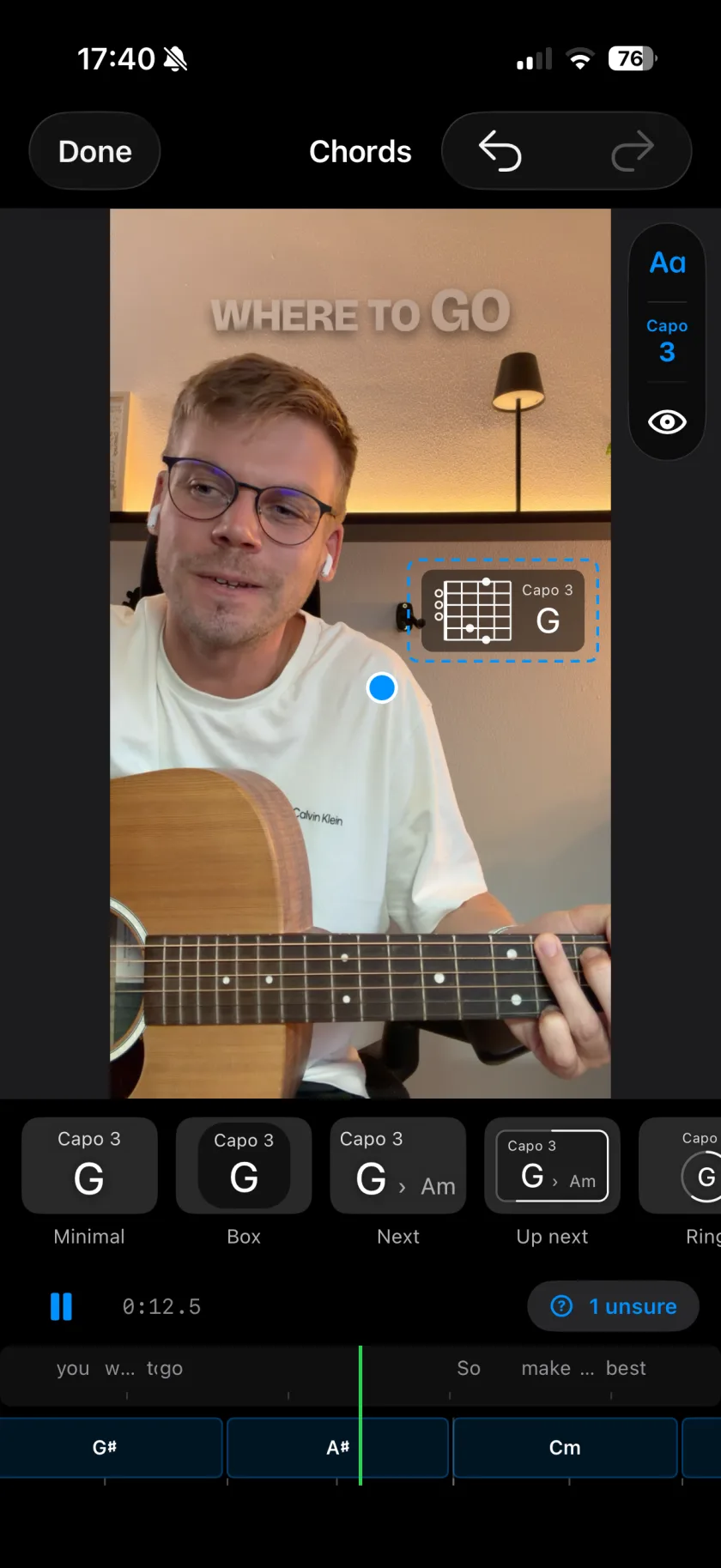
Turn on Show chords on video, then drag the chord label where you want it and pinch to resize it.
-
Pick a look
Choose one of the 15 looks, and set a capo or a transposition if you play with one.
-
Name only Pro
Minimal, Box, Next (with the next chord beside it), Up next and Ring.
-
Coloured Pro
Halo, which flares on the beat, and Ribbon.
-
Guitar grip Pro
Guitar and Guitar wide show the chord as the grip you play.
-
Keys Pro
Keys and Keys wide mark the chord's notes on one octave; Wheel lights them on a ring.
-
Visualizer Pro
Bars, Ribbons and Radial show the chord tones as moving shapes.
-
Capo and transpose Pro
Shift the shown chords by 0 to 11 semitones, labelled Capo N, Transpose +N or not at all.
-
What does it need to hear?
Chords that ring clearly: a guitar or a piano works best. A vocal alone has no chords to find.
-
Where does the analysis run?
On my server. The take is sent over an encrypted connection, analysed and not kept.
Musaic - Recording Studio is free on the App Store for iPhone and iPad. Musaic Pro adds lyrics, animations, chord detection and Fix audio, and removes the watermark.
- Generate bass, drums and keys from your chordsGuide
- Play instruments on your iPhone, on screen or with a MIDI keyboardGuide
Written for Musaic 1.4.0.